


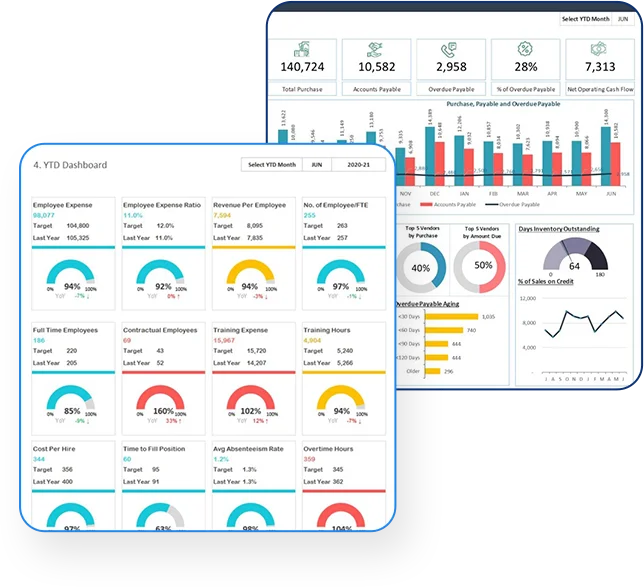
What is a CFO Dashboard and Why It Matters for Financial Leadership
A CFO Dashboard is a financial reporting tool that serves the purpose of presenting a summary view of the financial state of an organization. It is a summary view of all the organization’s Key Performance Indicators (KPIs) in one place, in an easy-to-understand format, through a Business Intelligence application. With a CFO Dashboard, the CFO, accountant, or entrepreneur will have full, real-time control over their company’s financial situation at any time. In the data age, the role of finance professionals is not only to make quick, smart decisions but also to have the right tools at their disposal to support those decisions.
A CFO dashboard is a reporting system that goes beyond a report. As a Finance leader, you are expected to know key metrics in your business to measure the performance, trends, and exposures. As an entrepreneur or a senior executive at a large corporation, having visibility into your financials is very important to your business decision-making and growth strategy.
Benefits of Using a CFO Dashboard Template for Financial Reporting
A CFO Dashboard Template is a pre-built template that helps streamline the process of setting up a financial reporting system. Rather than developing reports from the ground up and deciding which metrics to use and which visualizations to present them in, a pre-built template can be of great assistance in setting up a financial reporting system and in getting key stakeholders up to speed faster.
A CFO Dashboard Template can also help keep your accounting processes more consistent and accurate. The financial data will be displayed in the same format, making trends in your accounting reports easy to identify and compare across reports over time. If you would like to learn more about ways to improve your accounting reporting, then a CFO Dashboard Template may be able to help.
Core Features of a CFO Dashboard Excel for Financial Analysis
A CFO Dashboard Excel is a financial reporting tool that is flexible and easy to use.
All types of financial information required by a business to understand its financial position, profitability, and growth can be presented very effectively using a CFO Dashboard Excel.
All key financial indicators, such as sales, expenses, and profits, are presented clearly and concisely with this tool.
All the financial information required to assess a business’s performance can be presented effectively in Excel.
A CFO Dashboard Excel file is a powerful tool for performing a wide range of financial analyses within a business. This could include a comparison of forecast and actual performance for a business, as well as an analysis of trends in key performance indicators.
The tool enables the CFO to drill down into the data to gain more detailed information about the performance of specific business areas and focus on areas where there is scope to improve. Many businesses still find Excel to be the best and lowest-cost tool for managing financial information.
Advantages of the CFO Dashboard Google Sheet for Real-Time Collaboration
A CFO Dashboard Google Sheet is an Excel-like tool, but with the power of real-time collaboration. Because it is in the cloud, a Google Sheet CFO Dashboard allows stakeholders worldwide to view and edit it in real time from anywhere with internet access. Great for global and remote teams.
Our CFO Dashboard Google Sheet provides a real-time snapshot of key financial data that can be easily shared with others. Rather than emailing a report that may already be outdated by the time it is read, the CFO Dashboard enables far better communication.
Key Benefits of using the CFO Dashboard for financial reporting: Real-time reporting, no need to send or receive files (time-saving), better communication, and decision-making.
CFO Dashboard Power BI for Advanced Financial Analytics and Visualization
Why CFO Dashboard Power BI is Essential for Data-Driven Decisions
A CFO Dashboard Power BI can include a range of functions, advanced analytics, and visualizations.
This type of reporting tool is very different from the static reports we are used to. An interactive Power BI Dashboard brings the reporting tool to life. It enables the CFO and other stakeholders to drill down into the data to gain a better understanding of the financial situation.
CFO Dashboard Power BI provides clear, visual information to bring data to life and enable you to spot trends, patterns, and anomalies. With CFO Dashboard Power BI, you can make better decisions and respond more effectively to changing business and market conditions. The interactive visualizations significantly improve the presentation of large amounts of complex financial data.
Integrating CFO Dashboard Power BI with Accounting and ERP Systems
One of the many features of CFO Dashboard Power BI is the ability to connect to numerous data sources. Your accounting system could be QuickBooks, or your ERP system could be Oracle, SAP, or any other financial system you may be using. It can be connected to the CFO Dashboard Power BI, and the data will update in real time.
The CFO Dashboard Power BI links together large amounts of financial information from across all your systems to provide one version of the truth. Helping to reduce data silos and eliminate potential sources of error within your reports. A must-have tool for any organization looking to improve the productivity of its financial operations.
Key Financial KPIs in a CFO Dashboard Template
Core KPIs Every CFO Dashboard Should Track
A CFO Dashboard Template is a compilation of Key Performance Indicators (KPIs) that are important to track for an up-to-date financial snapshot of a business, including its current performance, trends, and operations.
The purpose of a CFO Dashboard is to provide visibility and enable informed business decisions to sustain success. KPIs for the CFO Dashboard will vary by business but may include metrics such as Revenue Growth Rate, Profit Margins, and Operating Expenses.
One of the core responsibilities of a CFO is to act as the business’s principal decision-maker by monitoring the business’s health and performance and interpreting financial market forces. Measuring key metrics for the business allows a CFO to validate the success of business initiatives, identify areas for improvement, and assess the company’s potential to achieve profitability and future growth.
A CFO Dashboard is designed to make the Key Performance Indicators (KPIs) that measure a company’s financial performance readily available and relevant to management and staff.
Advanced KPIs in CFO Dashboard Power BI for Strategic Insights
Most basic CFO Dashboards will have core financial metrics such as the income statement, balance sheet, and cash flow statements in some form.
However, the more advanced and valuable the insights provided in a CFO Dashboard, the more advanced KPIs should be introduced to deliver deeper analysis of the company’s financial performance.
Return on Investment (ROI), Working Capital Ratios, and Cash Conversion Cycle are examples of advanced KPIs that provide a more in-depth view of a company’s overall financial health and efficiency.
Advanced KPIs are used for strategic planning and long-term decision-making. By seeing the company’s performance from multiple perspectives, the CFO will be better equipped to make important, relevant decisions that drive future growth and profitability.
How the CFO Dashboard Template Improves Financial Management
Budgeting and Forecasting with CFO Dashboard Excel
A CFO Dashboard Excel is required to control budgeting and forecasting processes. The CFO Excel dashboard is very helpful for comparing actual values with budgeted values, analyzing variances to identify areas where actual performance differs from budgeted performance, and taking corrective measures.
Financial management relies heavily on accurate forecasting. Companies use historical data and apply models, techniques, and assumptions to estimate and forecast their future performance when making key financial and business decisions. Using a CFO Dashboard Excel helps to facilitate this process.
Cash Flow Management Using CFO Dashboard
Cash flow management is at the heart of every business, and a CFO Dashboard can make it easier to understand where cash is coming from and going to, enabling proper liquidity monitoring and maintaining adequate working capital levels.
A cash flow forecast is an estimate of the cash received and paid by a business over a given period.
The purpose of a cash flow forecast is to enable a business to identify when it is likely to experience a cash crisis. Once a cash crisis has been identified, a business can implement measures to avert it.
Conclusion
A CFO Dashboard is more than just a tool for increasing financial visibility and enabling better business decision-making; it is an essential tool for business growth. A well-designed CFO Dashboard provides timely, relevant key performance indicators (KPIs) in a format and at a frequency that enable effective financial and business management.
This will vary based on the size and nature of your business. Please see the table below to help you choose the CFO Dashboard version that is right for you. Bizinfograph offers ready-to-use dashboard templates for Finance, Sales, HR, and Manufacturing.
READ MORE: selftimes
